
Swift Alert
Swift Alert LLCEvents
4.9318.00 Reviews
- Version
- 3.4.6
- Installs
- 100.00K
- Age Rating
- Everyone
Screenshots
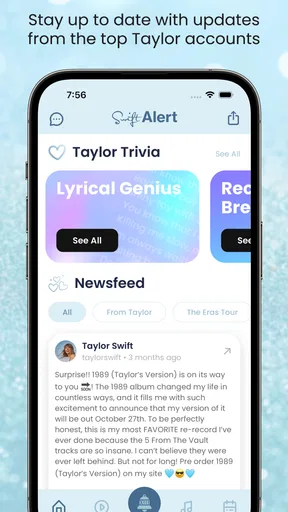
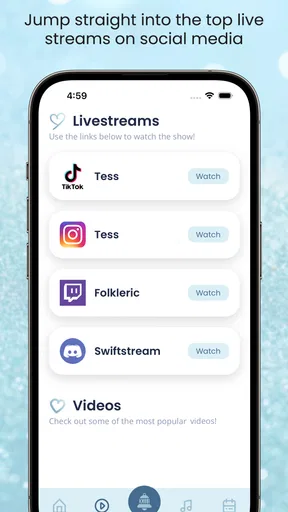
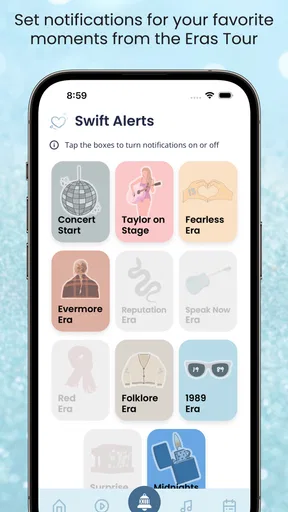
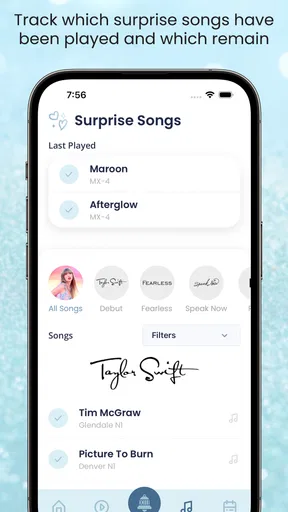
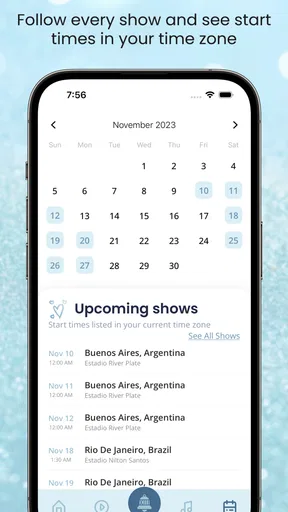
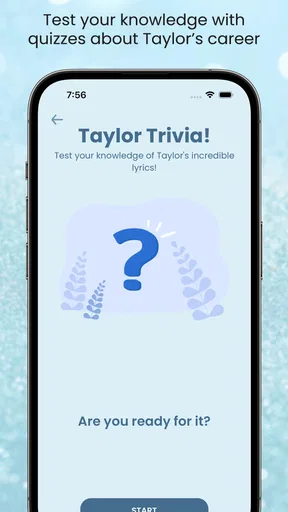
Our Review of Swift Alert
 Analysis by Appyee
When I first stumbled upon Swift Alert, I was curious about how it could fit into my daily routine. You know how it is; the app store is flooded with all kinds of notification apps promising to keep you organized and on top of things. So, I thought, "Why not give this one a shot?"
First Impressions
Installing Swift Alert was a breeze. The app’s interface is sleek and intuitive, making it easy for even the most tech-challenged among us. Right off the bat, I was impressed by how quickly I could set up alerts. The app offers a variety of alert types — from simple reminders for everyday tasks to more sophisticated notifications based on location and time.
What really caught my eye was the customization options. You can tweak the alert sounds, choose from a range of themes, and even set personalized messages. It's like having your own personal assistant who knows exactly how you want things done. And trust me, having an app that understands your preferences is a game-changer.
Features that Stand Out
One of the standout features is the geo-location alerts. Imagine this: you're walking past your favorite coffee shop, and bam, your phone reminds you of that discount coupon you have. It’s like magic! The app uses your location to trigger reminders that are relevant to where you are. No more forgetting the milk when you're two blocks away from the grocery store.
Another nifty feature is the integration with calendars and emails. It seamlessly syncs with your existing calendars, so you don’t have to worry about double-booking or missing an important meeting. Plus, it can send you email reminders, ensuring you’re always on top of your game.
For the security-conscious, Swift Alert respects your privacy. It doesn’t share your data without explicit permission, and everything is encrypted. In a world where privacy is a big concern, having an app that takes this seriously is a relief.
Everyday Use and Practicality
Using the app on a day-to-day basis is where it truly shines. I found myself relying on it more than I expected. Whether it was remembering to water the plants or reminding me of a friend's birthday, it handled it all seamlessly. It’s like having a little helper that keeps you from dropping the ball.
The battery usage was minimal, which was a pleasant surprise. You know how some apps drain your phone like it’s their job? Not this one. It runs quietly in the background without making a dent in your battery life.
Where Setup Can Get Tricky
Swift Alert is an event-focused app from Swift Alert LLC, so I would start by deciding which events I actually want it to follow rather than turning on every possible alert. That small bit of restraint makes notifications more useful: a focused set is easier to notice, and less likely to become background noise. The app is free to install, though in-app purchases range from $0.99 to $19.99 per item, so I would check any purchase screen carefully before confirming.
Because alerts depend on notifications reaching your phone, the first practical check is whether notifications are allowed for the app in the device’s settings. If an alert seems to be missing, I would also check whether the phone is silencing notifications or restricting background activity. These are sensible first checks for any alert app, not a guarantee that every delay has the same cause.
Location-based reminders need a little more thought than ordinary event notices. I would make sure the location permission and the phone’s location services are set as intended, then test a reminder in a familiar place before trusting it for something time-sensitive. A location prompt is most helpful as a nudge, not as the only safeguard for an appointment or a deadline.
A More Deliberate Alert Routine
A useful way to avoid notification overload is to separate alerts that need immediate attention from those that can wait. For example, I would reserve prominent notifications for the events I genuinely do not want to miss and use less intrusive reminders for lower-priority plans. If the app lets you tailor an alert’s sound or message, a clear, specific label is more useful than a vague one: “leave for the venue” tells me what to do, while “event” only tells me something happened.
For a busy week, I would check the app’s alert setup alongside my calendar rather than assuming that adding an event elsewhere automatically creates the right notification here. Calendar syncing can help reduce duplicate entry, but it is still worth checking that the event appears as expected and that the reminder timing suits your plans. This is especially useful when plans change: update the source you rely on, then confirm the alert is still relevant instead of keeping two conflicting reminders.
One realistic use is a concert day. I might use a tour-related alert to keep track of news I care about, then use my calendar for the travel time and a separate, clearly named reminder for anything I need to bring. That division keeps the app focused on event notifications without asking it to replace every planning tool on my phone. It also gives me a backup for the practical details that can matter more than the announcement itself.
What It Does Best—and What It Does Not Replace
The strongest case for this app is someone who wants event-related updates in one place and is willing to spend a few minutes choosing useful notifications. It is less compelling if you only need a basic alarm or a one-off task reminder; your phone’s built-in clock, calendar, or reminders app may already handle those jobs with less setup. I would not add another notification app just because it can send alerts. It should solve a real problem, such as keeping up with events that are easy to miss in a crowded feed.
Compared with checking an event organizer’s social posts or a general news feed, a dedicated alert app can make relevant notices easier to spot without requiring you to keep refreshing several sources. The trade-off is that any dedicated alert system depends on the notices it is designed to deliver and on your notification settings. It is not a substitute for checking the organizer’s official information when you need to confirm a last-minute change or make a travel decision.
Its audience is narrower than the broad everyday-reminder examples might suggest. If your main goal is tour notifications, the focus is a plus; if you want a full task manager for shopping lists, recurring chores, and complex projects, I would choose a tool built around those jobs instead. The app is rated for Everyone, but the best fit still depends on whether its event focus matches how you actually use your phone.
When an Alert Goes Missing
If an alert does not appear, I would troubleshoot in a calm order rather than immediately deleting the app. First, check that the event or alert is still present and that its details look right. Then review notification permissions, sound and focus settings, and any battery or background restrictions on the device. If the reminder is location-based, check location access as well. After changing a setting, test with a low-stakes reminder so you can tell whether the change helped.
If the app opens normally but one particular notification is late, that does not automatically mean the app itself is broken. A phone may delay or hide notifications under its current settings, and a location alert can be less dependable in places where the phone has trouble determining where it is. For a time-critical plan, keep a second reminder in the calendar or another trusted tool. That is not elegant, but it is a sensible backup when missing the notice would have consequences.
When nothing arrives after those checks, I would make a note of which alert was affected and what the phone was doing at the time. That gives you a clearer basis for deciding whether the problem is recurring and for seeking help, rather than changing several settings at once and losing track of what worked. I would avoid assuming that reinstalling is the first answer; it can create extra setup work and may not address a device-level notification restriction.
How It Fits into a Crowded App Store
Swift Alert has an average rating of 4.9 from around 21,000 ratings, with over 100,000 installs. Those figures suggest that many people find it useful, but I would treat them as context rather than proof that it will suit every routine. A person who follows events closely has a clearer reason to keep it than someone who rarely needs event updates. The more specific your need, the easier it is to judge whether the notifications earn their place on your phone.
It was released on August 23, 2023, and version 3.4.2 requires Android 7.0 or later. That makes the minimum Android requirement worth checking before installing on an older device. The app is free to start, while optional purchases can add cost; I would use the free experience first and only pay if an available item addresses something I genuinely want. That keeps the decision grounded in your own usage instead of the promise of extra options.
For an everyday comparison, a general calendar is usually better at managing appointments across work and personal life, while a social feed can be better for browsing a wide range of event chatter. Swift Alert makes the most sense as a more focused companion when the event alerts themselves are what you want to follow. I would not expect one app to replace all three roles. Keeping each tool responsible for the job it handles best makes it easier to notice important information and avoid duplicate alerts.
Room for Improvement
Of course, no app is perfect. There were a few hiccups along the way. Occasionally, the location-based alerts would trigger a bit too late, but this didn’t happen often enough to be a major issue. A few other users have also mentioned the same in their reviews, so it’s something the developers might want to look into.
Additionally, while the app is pretty intuitive, a short tutorial for first-time users wouldn’t hurt. I figured things out with a bit of trial and error, but a guided setup could make the onboarding process even smoother.
Who I Would Recommend It To
I would recommend it to someone who follows tours or events and wants a focused way to catch relevant notifications without relying on memory alone. It is also a reasonable choice if you are comfortable checking permissions and tuning alerts when your phone’s settings get in the way. People who dislike notifications, rarely follow events, or already have a dependable routine through a calendar may not gain enough to justify another app.
Before settling in, I would decide what would count as success: catching a particular kind of update, reducing the number of sources I check, or simply being reminded at the right moment. Then I would keep only the alerts that serve that goal. If the app starts adding noise instead of reducing it, change the setup or return to the calendar and tools you already trust. The point is not to collect notifications; it is to make the useful ones easier to act on.
Final Thoughts
Overall, Swift Alert has earned its spot on my home screen. It’s practical, easy to use, and surprisingly helpful. Whether you’re juggling work deadlines, social commitments, or just trying to stay on top of daily tasks, this app is a trusty companion. If you’re looking for a notification app that does more than just beep at you, this is definitely worth trying.
If you’re keen to check it out, you can find it on both Android and iOS. Once you’ve tried it, I’d love to hear your thoughts. Have you found it as useful as I did?
Verdict
Strengths of Swift Alert
- User-friendly interface for quick navigation.
- Customizable alerts for various situations.
- Real-time updates ensure timely information.
- Low battery consumption for prolonged use.
- Supports multiple languages for wider accessibility.
Limitations of Swift Alert
- Limited free version features available.
- Occasional alert delays reported by users.
- Requires constant internet connection.
- No integration with smart home devices.
- Ads can be intrusive in the free version.
Similar Picks in This Category
View All
Easy Quran Mp3 Audio Offline
Muslim Worldapp4.7

Invitation Maker: Cards & RSVP
Greetings Island4.9

StubHub - Live Event Tickets
StubHub4.3

Fever: Events & Tickets
Fever Labs4.7

Epic Freebie Games Radar
Arioch Pds - Apps & Games4.4

Invitation card Maker, Design
Splendid App Maker4.9
Frequently Asked Questions
What is Swift Alert and how does it work?
Swift Alert is a mobile application designed to provide users with real-time notifications for emergencies, weather updates, and important news. The app utilizes GPS technology to deliver location-specific alerts, ensuring users receive relevant information directly to their devices. By offering customizable alert settings, Swift Alert allows users to tailor notifications according to their preferences and needs.
Is Swift Alert available for both Android and iOS devices?
Yes, Swift Alert is available for download on both Android and iOS platforms. Users can find it on the Google Play Store for Android devices and the Apple App Store for iOS devices. The app is designed to be user-friendly and compatible with a wide range of devices, ensuring accessibility for most smartphone users.
Does Swift Alert require an internet connection to function?
Swift Alert requires an active internet connection to deliver real-time updates and notifications. While the app can store previously received alerts for offline viewing, a stable internet connection is essential for receiving the latest information and updates. Users are encouraged to ensure their devices are connected to Wi-Fi or mobile data for optimal performance.
Are there any costs associated with using Swift Alert?
Swift Alert is free to download and use, offering essential features at no cost. However, it may offer premium features or ad-free experiences through in-app purchases or subscription models. Users can choose to enhance their experience by opting into these additional features, but the core functionalities remain accessible for free.
How secure is my personal information with Swift Alert?
Swift Alert prioritizes user privacy and data security. The app collects minimal personal information necessary to provide location-based alerts and does not share user data with third parties without consent. Swift Alert employs encryption protocols to safeguard user data, ensuring a secure experience for all users.
